


Audit trails track what happens at every step of a
dplyr pipeline by recording metadata-only snapshots: row counts, column
changes, NA totals, numeric shifts, and custom functions. Build a trail
by dropping taps into your pipe — transparent
pass-throughs that record a snapshot and let the data flow on unchanged.
Operation-aware taps, such as left_join_tap() and
filter_tap() go further, capturing match rates and drop
counts. The result is a structured trail you can print, diff, export as
HTML, or serialize to JSON. You can learn more in
vignette("tidyaudit").
tidyaudit also includes a diagnostic toolkit for
interactive data exploration — join validation, key checks, table
comparison, and more — described in
vignette("diagnostics").
library(tidyaudit)
library(dplyr)
set.seed(123)

orders  <- data.frame(id = 1:100, amount = runif(100, 10, 500), region_id = sample(1:5, 100, TRUE))
regions <- data.frame(region_id = 1:4, name = c("North", "South", "East", "West"))

trail <- audit_trail("order_pipeline")

result <- orders |>
  audit_tap(trail, "raw") |>
  left_join_tap(regions, by = "region_id", .trail = trail, .label = "with_region") |>
  filter_tap(amount > 100, .trail = trail, .label = "high_value", .stat = amount)
#> i filter_tap: amount > 100
#> Dropped 18 of 100 rows (18.0%)
#> Stat amount: dropped 1,062.191 of 25,429.39

print(trail)
#> -- Audit Trail: "order_pipeline" -----------------------------------------------
#> Created: 2026-02-21 14:36:35
#> Snapshots: 3
#>
#>   #  Label        Rows  Cols  NAs  Type
#>   -  -----------  ----  ----  ---  ------------------------------------
#>   1  raw           100     3    0  tap
#>   2  with_region   100     4   23  left_join (many-to-one, 77% matched)
#>   3  high_value     82     4   20  filter (dropped 18 rows, 18%)
#>
#> Changes:
#>   raw -> with_region: = rows, +1 cols, +23 NAs
#>   with_region -> high_value: -18 rows, = cols, -3 NAs

audit_diff(trail, "raw", "high_value")
#> -- Audit Diff: "raw" -> "high_value" --
#>
#>   Metric  Before  After  Delta
#>   ------  ------  -----  -----
#>   Rows       100     82    -18
#>   Cols         3      4     +1
#>   NAs          0     20    +20
#>
#> Columns added: name
#>
#> Numeric shifts (common columns):
#>     Column     Mean before  Mean after   Shift
#>     ---------  -----------  ----------  ------
#>     id               50.50       49.66   -0.84
#>     amount          254.29      297.16  +42.87
#>     region_id         3.08        3.05   -0.03
Three taps. Three snapshots. A complete record of what the pipeline did to your data — and what it cost.
Share a trail as a self-contained HTML file — one file you can email, attach to a report, or drop into a compliance folder:
audit_export(trail, "order_pipeline.html")The output is an interactive flow diagram with clickable nodes and edges, light/dark theme toggle, and embedded JSON export. No server or internet required.
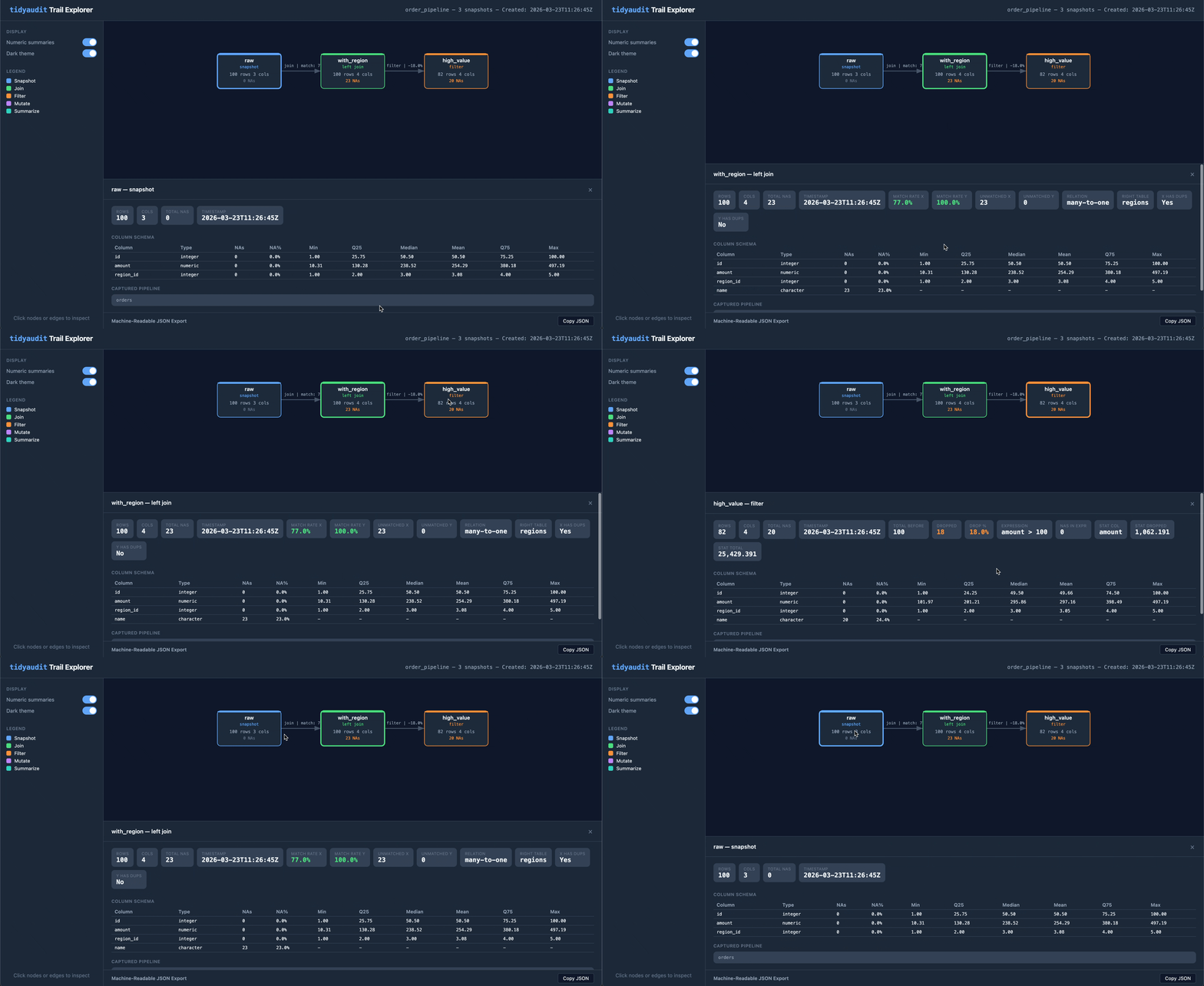
Build a structured timeline of your pipeline’s behavior. Drop taps into any dplyr pipe and get a traceable, diffable, exportable record of every step.
audit_trail() / audit_tap() — create a
trail and record snapshots inside pipesleft_join_tap(), filter_tap(), and friends
— operation-aware taps that capture match rates, drop
counts, stat impact, and relationship typestab_tap() — track frequency distributions across
pipeline stepsaudit_diff() — before/after comparison of any two
snapshotsaudit_report() — full pipeline report in one callaudit_export() — self-contained HTML visualizationwrite_trail() / read_trail() — serialize
to RDS or JSON for CI pipelines and dashboards.numeric_summary,
.cols_include, .cols_exclude) — fine-tune what
each tap capturesStandalone functions for interactive data exploration — the questions you ask in the console before, during, and after building a pipeline.
validate_join() — analyze a join before performing it
(match rates, duplicates, unmatched keys)validate_primary_keys() /
validate_var_relationship() — key and relationship
validationcompare_tables() — column, row, numeric, and
categorical comparison between two data framesfilter_keep() / filter_drop() — filter
with diagnostic output and configurable warning thresholdsdiagnose_nas() / summarize_column() /
get_summary_table() — data quality diagnosticsdiagnose_strings() / audit_transform() —
string quality auditing and type-aware transformation diagnosticstab() — frequency tables and crosstabulations with
sorting, cutoffs, and weighting# Install from CRAN
install.packages("tidyaudit")
# Install development version
pak::pak("fpcordeiro/tidyaudit")tidyaudit is the tidyverse-native counterpart to dtaudit, a data.table-based package on CRAN. Same design vocabulary, independent implementations — choose the one that matches your stack.
LGPL (>= 3)