

contentanalysis is a comprehensive R package designed
for in-depth analysis of scientific literature. It bridges the gap
between raw PDF documents and structured, analyzable data by combining
advanced text extraction, citation analysis, and bibliometric enrichment
from external databases.
AI-Enhanced PDF Import: The package supports AI-assisted PDF text extraction through Google’s Gemini API, enabling more accurate parsing of complex document layouts. To use this feature, you need to obtain an API key from Google AI Studio.
Integration with bibliometrix: This package
complements the science mapping analyses available in
bibliometrix and its Shiny interface
biblioshiny. If you want to perform content analysis within
a user-friendly Shiny application with all the advantages of an
interactive interface, simply install bibliometrix and
launch biblioshiny, where you’ll find a dedicated
Content Analysis menu that implements all the analyses
and outputs of this library.
The package goes beyond simple PDF parsing by creating a multi-layered analytical framework:
Intelligent PDF Processing: Extracts text from multi-column PDFs while preserving document structure (sections, paragraphs, references)
Citation Intelligence: Detects and extracts citations in multiple formats (numbered, author-year, narrative, parenthetical) and maps them to their precise locations in the document
Bibliometric Enrichment: Automatically retrieves and integrates metadata from external sources:
Citation-Reference Linking: Implements sophisticated matching algorithms to connect in-text citations with their corresponding references, handling various citation styles and ambiguous cases
Context-Aware Analysis: Extracts the textual context surrounding each citation, enabling semantic analysis of how references are used throughout the document
Network Visualization: Creates interactive networks showing citation co-occurrence patterns and conceptual relationships within the document
Rhetorical Move Analysis: Automatically classifies sentences according to their rhetorical function (Swales’ CARS model and extensions), combining rule-based cue phrase detection with LLM classification via Google Gemini API
PDF Document → Text Extraction → Citation Detection → Reference Parsing
↓
CrossRef/OpenAlex APIs
↓
Citation-Reference Matching → Enriched Dataset
↓
Network Analysis + Text Analytics + Bibliometric Indicators + Rhetorical Move Analysis
The result is a rich, structured dataset that transforms a static PDF into an analyzable knowledge object, ready for: - Content analysis: Understanding what concepts and methods are discussed - Citation analysis: Examining how knowledge is constructed and referenced - Temporal analysis: Tracking the evolution of ideas through citation patterns - Network analysis: Visualizing intellectual connections - Readability assessment: Evaluating text complexity and accessibility - Discourse analysis: Mapping the rhetorical structure of scientific argumentation
[1],
[1-3], [1,5,7](Smith, 2020),
(Smith et al., 2020)Smith (2020) demonstrated...(see Smith, 2020; Jones et al., 2021)You can install the development version from GitHub:
# install.packages("devtools")
devtools::install_github("massimoaria/contentanalysis")Complete workflow analyzing a real scientific paper:
library(contentanalysis)The paper is an open access article by Aria et al.:
Aria, M., Cuccurullo, C., & Gnasso, A. (2021). A comparison among interpretative proposals for Random Forests. Machine Learning with Applications, 6, 100094.
paper_url <- "https://raw.githubusercontent.com/massimoaria/contentanalysis/master/inst/examples/example_paper.pdf"
download.file(paper_url, destfile = "example_paper.pdf", mode = "wb")doc <- pdf2txt_auto("example_paper.pdf",
n_columns = 2,
citation_type = "author_year")
#> Using 17 sections from PDF table of contents
#> Found 15 sections: Introduction, Related work, Internal processing approaches, Random forest extra information, Visualization toolkits, Post-Hoc approaches, Size reduction, Rule extraction, Local explanation, Comparison study, Experimental design, Analysis, Conclusion, Acknowledgment, References
#> Normalized 32 references with consistent \n\n separators
# Check detected sections
names(doc)
#> [1] "Full_text" "Introduction"
#> [3] "Related work" "Internal processing approaches"
#> [5] "Random forest extra information" "Visualization toolkits"
#> [7] "Post-Hoc approaches" "Size reduction"
#> [9] "Rule extraction" "Local explanation"
#> [11] "Comparison study" "Experimental design"
#> [13] "Analysis" "Conclusion"
#> [15] "Acknowledgment" "References"analysis <- analyze_scientific_content(
text = doc,
doi = "10.1016/j.mlwa.2021.100094",
mailto = "your@email.com",
citation_type = "author_year"
)
#> Extracting author-year citations only
#> Attempting to retrieve references from CrossRef...
#> Successfully retrieved 33 references from CrossRef
#> Fetching Open Access metadata for 14 DOIs from OpenAlex...
#> Successfully retrieved metadata for 14 references from OpenAlex
#> Enriching CrossRef references with 32 PDF-parsed entries...
#> Enriched 10 CrossRef references with PDF-parsed dataThis single function call:
analysis$summary
#> $total_words_analyzed
#> [1] 3230
#>
#> $unique_words
#> [1] 1238
#>
#> $citations_extracted
#> [1] 49
#>
#> $narrative_citations
#> [1] 15
#>
#> $parenthetical_citations
#> [1] 34
#>
#> $complex_citations_parsed
#> [1] 12
#>
#> $lexical_diversity
#> [1] 0.3832817
#>
#> $average_citation_context_length
#> [1] 2856.061
#>
#> $citation_density_per_1000_words
#> [1] 6.83
#>
#> $references_parsed
#> [1] 33
#>
#> $citations_matched_to_refs
#> [1] 41
#>
#> $match_quality
#> # A tibble: 2 × 3
#>   match_confidence     n percentage
#>   <chr>            <int>      <dbl>
#> 1 high                41       83.7
#> 2 no_match_author      8       16.3
#>
#> $citation_type_used
#> [1] "author_year"readability <- calculate_readability_indices(doc$Full_text, detailed = TRUE)
readability
#> # A tibble: 1 × 12
#> flesch_kincaid_grade flesch_reading_ease automated_readability_index
#> <dbl> <dbl> <dbl>
#> 1 12.5 34.2 11.9
#> # ℹ 9 more variables: gunning_fog_index <dbl>, n_sentences <int>,
#> # n_words <int>, n_syllables <dbl>, n_characters <int>,
#> # n_complex_words <int>, avg_sentence_length <dbl>,
#> # avg_syllables_per_word <dbl>, pct_complex_words <dbl>analysis$citation_metrics$type_distribution
#> # A tibble: 9 × 3
#> citation_type n percentage
#> <chr> <int> <dbl>
#> 1 parsed_from_multiple 12 24.5
#> 2 author_year_basic 9 18.4
#> 3 author_year_and 8 16.3
#> 4 narrative_etal 7 14.3
#> 5 author_year_etal 3 6.12
#> 6 narrative_three_authors_and 3 6.12
#> 7 narrative_two_authors_and 3 6.12
#> 8 narrative_four_authors_and 2 4.08
#> 9 see_citations 2 4.08head(analysis$citation_contexts[, c("citation_text_clean", "section", "full_context")])
#> # A tibble: 6 × 3
#> citation_text_clean section full_context
#> <chr> <chr> <chr>
#> 1 (Mitchell, 1997) Introduction on their own and make…
#> 2 (Breiman, Friedman, Olshen, & Stone, 1984) Introduction are supervised learni…
#> 3 (Breiman, 2001) Introduction node of a random subs…
#> 4 (see Breiman, 1996) Introduction single training set a…
#> 5 (Hastie, Tibshirani, & Friedman, 2009) Introduction by calculating predic…
#> 6 (Hastie et al., 2009) Introduction accuracy is not cruci…Create interactive network visualizations showing how citations co-occur within your document:
# Create citation network
network <- create_citation_network(
  citation_analysis_results = analysis,
  max_distance = 800,          # Max distance between citations (characters)
  min_connections = 2,          # Minimum connections to include a node
  show_labels = TRUE
)

# Display interactive network
network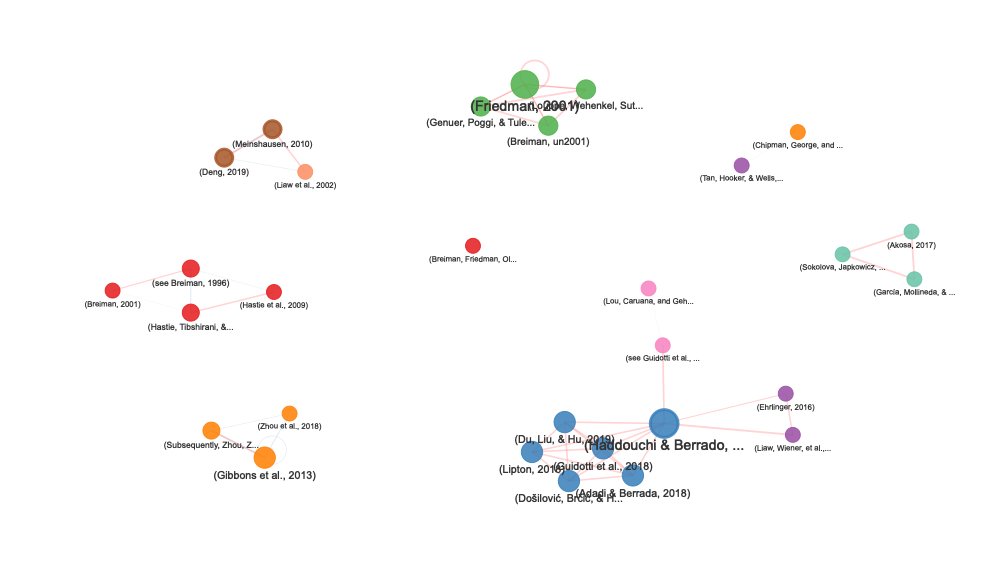
stats <- attr(network, "stats")

# Network size
cat("Nodes:", stats$n_nodes, "\n")
#> Nodes: 29
cat("Edges:", stats$n_edges, "\n")
#> Edges: 50
cat("Average distance:", stats$avg_distance, "characters\n")
#> Average distance: 246.9 characters

# Citations by section
print(stats$section_distribution)
#>                   primary_section n
#> 1                    Related work 6
#> 2                    Introduction 5
#> 3                  Size reduction 4
#> 4             Experimental design 3
#> 5 Random forest extra information 3
#> 6          Visualization toolkits 3
#> 7               Local explanation 2
#> 8                 Rule extraction 2
#> 9                        Analysis 1

# Multi-section citations
if (nrow(stats$multi_section_citations) > 0) {
  print(stats$multi_section_citations)
}
#>                 citation_text
#> 1             (Breiman, 2001)
#> 2 (Haddouchi & Berrado, 2019)
#> 3         (Meinshausen, 2010)
#> 4                (Deng, 2019)
#>                                                         sections n_sections
#> 1                  Introduction, Random forest extra information          2
#> 2 Related work, Random forest extra information, Rule extraction          3
#> 3                    Rule extraction, Comparison study, Analysis          3
#> 4 Rule extraction, Comparison study, Analysis 3The citation network visualization includes:
# Focus on very close citations only
network_close <- create_citation_network(
  analysis,
  max_distance = 300,
  min_connections = 1
)

# Show only highly connected citations
network_hubs <- create_citation_network(
  analysis,
  max_distance = 1000,
  min_connections = 5
)

# Hide labels for cleaner visualization
network_clean <- create_citation_network(
  analysis,
  show_labels = FALSE
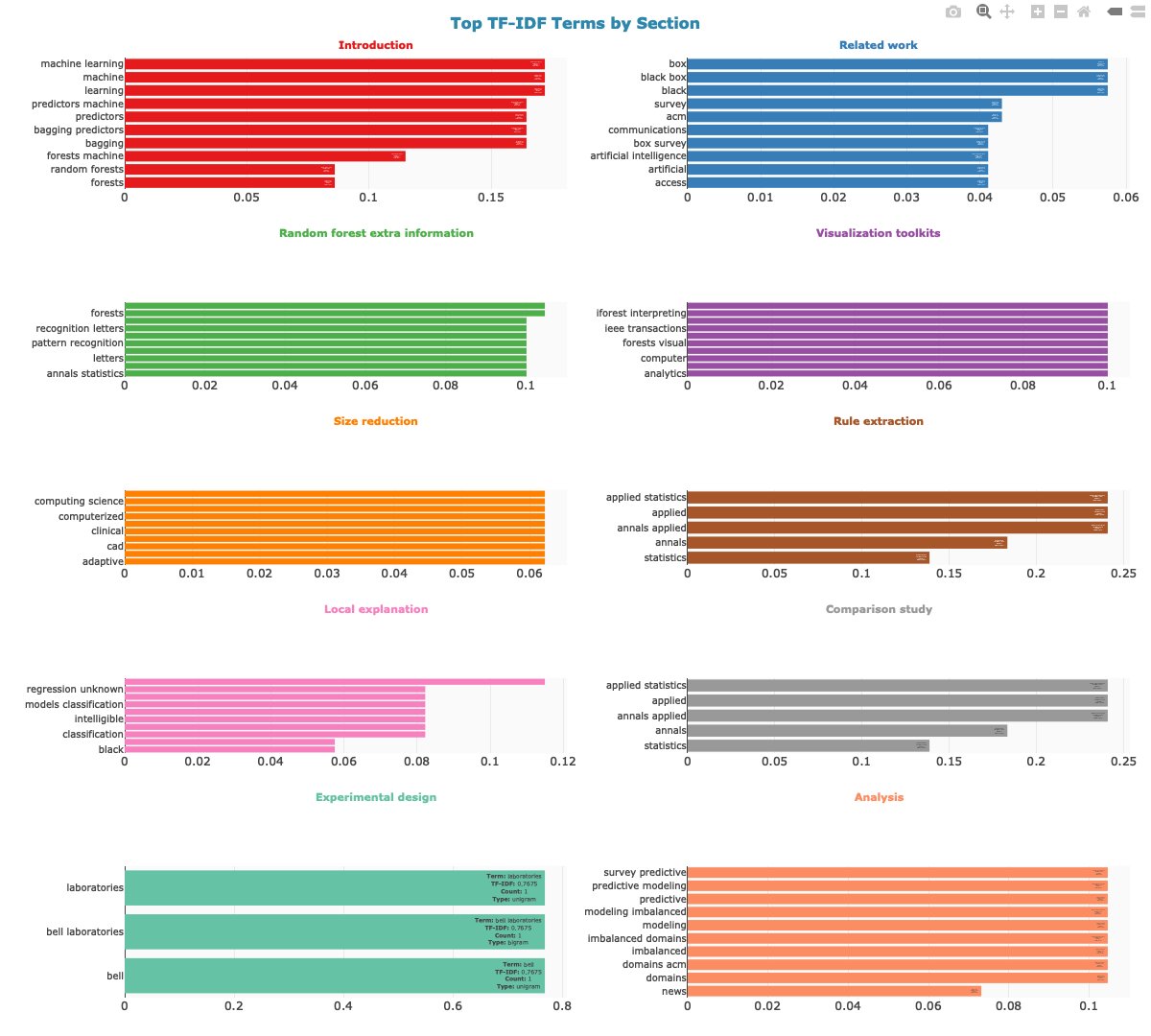
)Describe the thematic focus of each section’s bibliography using TF-IDF analysis of reference titles:
# Generate cluster descriptions
cluster_desc <- describe_citation_clusters(analysis, top_n = 10)

# View summary: top terms per section
cluster_desc$cluster_summary
#> # A tibble: 10 × 3
#>    section                         n_references top_terms
#>    <chr>                                  <int> <chr>
#>  1 Introduction                               5 learning, bagging, bagging pred…
#>  2 Related work                               7 interpretable machine, interpre…
#>  3 Random forest extra information            5 forests, random forests, annals…
#>  4 Visualization toolkits                     4 tree, forests, random forests, …
#>  5 Size reduction                             4 adaptive, adaptive diagnostic, …
#>  6 Rule extraction                            2 annals applied, applied, applie…
#>  7 Local explanation                          2 box classifiers, classification…
#>  8 Comparison study                           1 annals applied, applied, applie…
#>  9 Experimental design                        3 bell, bell laboratories, labora…
#> 10 Analysis                                   3 acm computing, computing survey…

# View detailed TF-IDF scores
cluster_desc$cluster_descriptions
#> # A tibble: 83 × 7
#>    section      ngram                ngram_size     n    tf   idf tf_idf
#>    <chr>        <chr>                     <int> <int> <dbl> <dbl>  <dbl>
#>  1 Introduction learning                      1     2  0.08  1.61 0.129
#>  2 Introduction bagging                       1     1  0.04  2.30 0.0921
#>  3 Introduction bagging predictors            2     1  0.04  2.30 0.0921
#>  4 Introduction belmont                       1     1  0.04  2.30 0.0921
#>  5 Introduction belmont wadsworth             2     1  0.04  2.30 0.0921
#>  6 Introduction data                          1     1  0.04  2.30 0.0921
#>  7 Introduction data mining                   2     1  0.04  2.30 0.0921
#>  8 Introduction elements                      1     1  0.04  2.30 0.0921
#>  9 Introduction elements statistical          2     1  0.04  2.30 0.0921
#> 10 Introduction inference                     1     1  0.04  2.30 0.0921
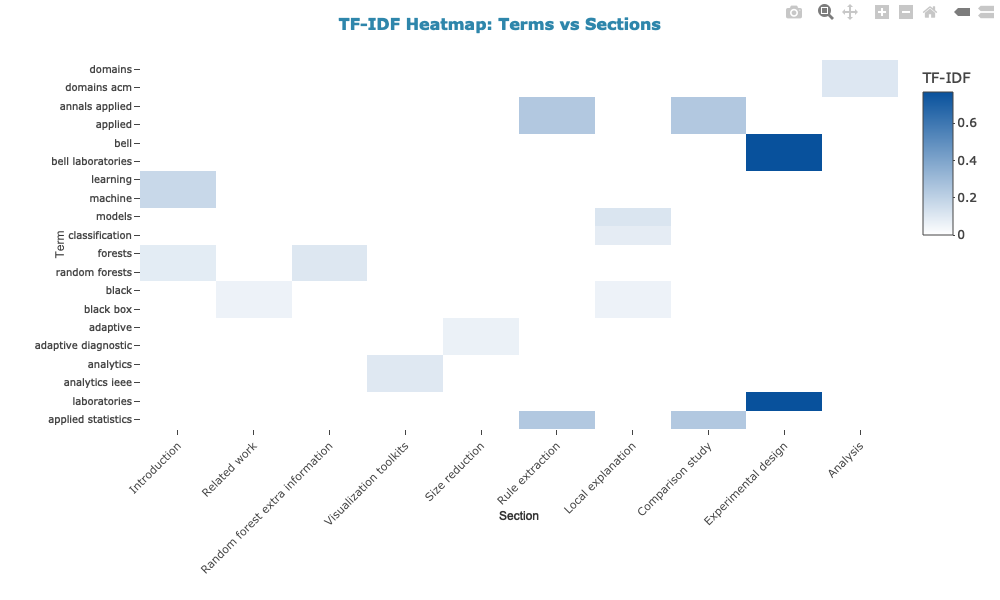
#> # ℹ 73 more rowsCreate interactive plotly visualizations that complement the citation network:
1. TF-IDF terms per section (2-column grid layout)
2. Heatmap: terms vs sections (unique vs shared terms)
3. References per section
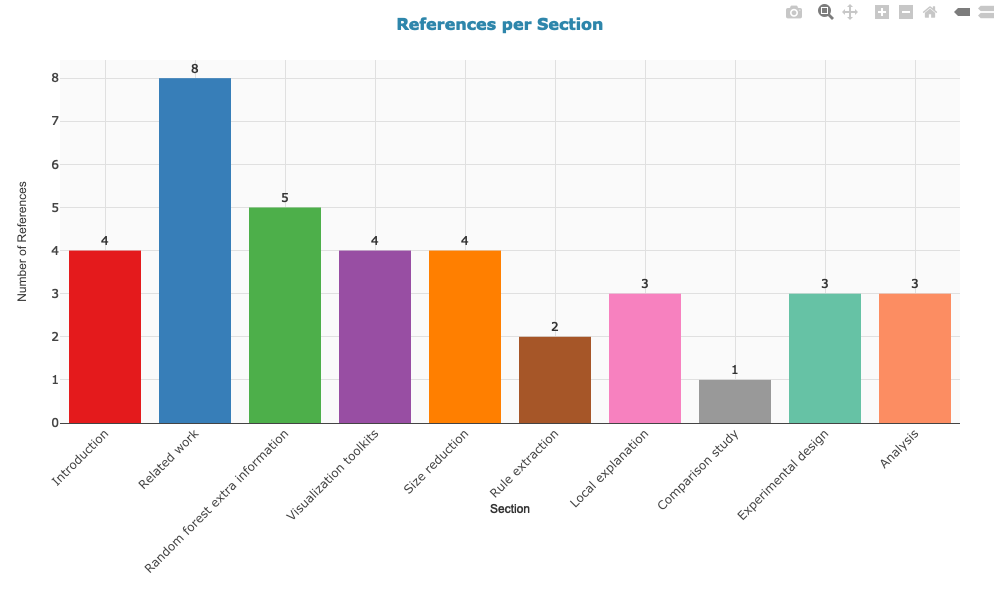
The TF-IDF bar chart uses a 2-column grid layout with color-coded section titles for a compact, readable overview. All plots display sections in the order they appear in the paper, use consistent styling, and include interactive hover information. Colors match the section colors used in the citation network.
Automatically classify the rhetorical function of each sentence in a scientific paper, based on Swales’ CARS model and extensions for Literature Review and Discussion sections.
# Classify rhetorical moves using cue phrase dictionaries
moves <- classify_rhetorical_moves(doc, use_llm = FALSE)
#> Analyzing rhetorical moves in 12 sections: Introduction, Related work, Internal processing approaches, Random forest extra information, Visualization toolkits, Post-Hoc approaches, Size reduction, Rule extraction, Local explanation, Comparison study, Analysis, Conclusion
#> Segmented 194 sentences

# Sentence-level classification
head(moves$sentences[, c("sentence_id", "section", "move", "step", "confidence")])
#> # A tibble: 6 × 5
#>   sentence_id section      move                    step               confidence
#>         <dbl> <chr>        <chr>                   <chr>                   <dbl>
#> 1           1 Introduction Unclassified            Unclassified             0
#> 2           2 Introduction Unclassified            Unclassified             0
#> 3           3 Introduction Unclassified            Unclassified             0
#> 4           4 Introduction M3: Occupying the niche Announcing purpose       0.45
#> 5           5 Introduction Unclassified            Unclassified             0
#> 6           6 Introduction Unclassified            Unclassified             0
# Aggregated move blocks (consecutive sentences with the same move)
head(moves$move_blocks[, c("block_id", "section", "move", "n_sentences", "avg_confidence")])
#> # A tibble: 6 × 5
#> block_id section move n_sentences avg_confidence
#> <dbl> <chr> <chr> <dbl> <dbl>
#> 1 1 Introduction Unclassified 3 0
#> 2 2 Introduction M3: Occupying the niche 1 0.45
#> 3 3 Introduction Unclassified 3 0
#> 4 4 Introduction M2: Establishing a niche 1 0.35
#> 5 5 Introduction M1: Establishing a territory 1 0.65
#> 6 6 Introduction Unclassified 6 0# Move distribution across sections
moves$summary$move_distribution
#> # A tibble: 20 × 4
#> section move n pct
#> <chr> <chr> <int> <dbl>
#> 1 Analysis M1: Establishing a territory 3 42.9
#> 2 Analysis M2: Establishing a niche 1 14.3
#> 3 Analysis M3: Occupying the niche 3 42.9
#> 4 Comparison study M3: Occupying the niche 1 100
#> 5 Conclusion M2: Evaluating the study 2 66.7
#> 6 Conclusion M3: Looking forward 1 33.3
#> 7 Introduction M1: Establishing a territory 2 28.6
#> 8 Introduction M2: Establishing a niche 2 28.6
#> 9 Introduction M3: Occupying the niche 3 42.9
#> 10 Local explanation M1: Establishing a territory 6 85.7
#> 11 Local explanation M2: Establishing a niche 1 14.3
#> 12 Post-Hoc approaches M3: Occupying the niche 1 100
#> 13 Related work M1: Establishing context 1 50
#> 14 Related work M2: Reviewing prior work 1 50
#> 15 Rule extraction M1: Establishing a territory 1 33.3
#> 16 Rule extraction M2: Establishing a niche 2 66.7
#> 17 Size reduction M1: Establishing a territory 2 40
#> 18 Size reduction M2: Establishing a niche 2 40
#> 19 Size reduction M3: Occupying the niche 1 20
#> 20 Visualization toolkits M1: Establishing a territory 3 100For higher accuracy, the function can combine rule-based detection with LLM classification via Google Gemini API. This requires a Gemini API key from Google AI Studio.
# Set your Gemini API key
Sys.setenv(GEMINI_API_KEY = "your-api-key-here")

# Hybrid classification with progress bar
moves_hybrid <- classify_rhetorical_moves(doc, use_llm = TRUE, model = "2.5-flash")

# View the rhetorical flow of the paper
moves_hybrid$summary$flow_patternRhetorical move analysis can be activated as part of the full content analysis pipeline:
analysis <- analyze_scientific_content(
  text = doc,
  doi = "10.1016/j.mlwa.2021.100094",
  citation_type = "author_year",
  rhetorical_moves = TRUE  # Activate rhetorical analysis
)

# Access results
analysis$rhetorical_moves$sentences
analysis$rhetorical_moves$move_blocks
analysis$rhetorical_moves$summarymethod_terms <- c("machine learning", "regression", "validation", "dataset")
word_dist <- calculate_word_distribution(doc, method_terms)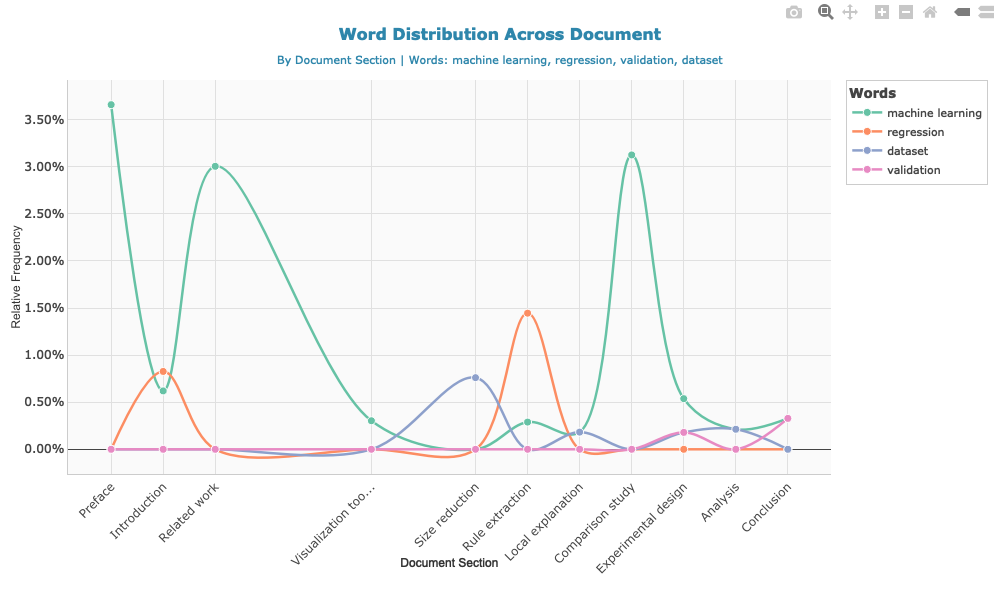
head(analysis$word_frequencies, 10)
#> # A tibble: 10 × 4
#>    word            n frequency  rank
#>    <chr>       <int>     <dbl> <int>
#>  1 model          41   0.0127      1
#>  2 accuracy       40   0.0124      2
#>  3 forest         39   0.0121      3
#>  4 trees          37   0.0115      4
#>  5 random         30   0.00929     5
#>  6 set            27   0.00836     6
#>  7 variable       26   0.00805     7
#>  8 data           24   0.00743     8
#>  9 predictions    23   0.00712     9
#> 10 variables 23 0.00712 10head(analysis$network_data)
#> # A tibble: 6 × 5
#> citation1 citation2 distance type1 type2
#> <chr> <chr> <int> <chr> <chr>
#> 1 (Mitchell, 1997) (Breiman, Fri… 701 auth… auth…
#> 2 (Breiman, Friedman, Olshen, & Stone, 1984) (Breiman, 200… 715 auth… auth…
#> 3 (Breiman, Friedman, Olshen, & Stone, 1984) (see Breiman,… 986 auth… see_…
#> 4 (Breiman, 2001) (see Breiman,… 257 auth… see_…
#> 5 (Breiman, 2001) (Hastie, Tibs… 617 auth… auth…
#> 6 (Breiman, 2001) (Hastie et al… 829 auth… auth…# View parsed references (enriched with CrossRef and OpenAlex)
head(analysis$parsed_references[, c("ref_first_author", "ref_year", "ref_journal", "ref_source")])
#> ref_first_author ref_year ref_journal ref_source
#> 1 Adadi 2018 IEEE Access crossref
#> 2 <NA> <NA> <NA> crossref
#> 3 Branco 2016 ACM Computing Surveys crossref
#> 4 Breiman 1996 Machine Learning crossref
#> 5 Breiman 2001 Machine Learning crossref
#> 6 Breiman 1984 International Group crossref
# Check data sources
table(analysis$parsed_references$ref_source)
#>
#> crossref
#> 33The ref_source column indicates where the data came
from:
"crossref": Retrieved from CrossRef API"parsed": Extracted from document’s reference
section# View citation-reference matches with confidence levels
library(dplyr)
#>
#> Attaching package: 'dplyr'
#> The following objects are masked from 'package:stats':
#>
#> filter, lag
#> The following objects are masked from 'package:base':
#>
#> intersect, setdiff, setequal, union
head(analysis$citation_references_mapping[, c("citation_text_clean", "ref_authors",
"ref_year", "match_confidence")])
#> # A tibble: 6 × 4
#> citation_text_clean ref_authors ref_year match_confidence
#> <chr> <chr> <chr> <chr>
#> 1 (Mitchell, 1997) Mitchell 1997 high
#> 2 (Breiman, Friedman, Olshen, & Stone, 19… Breiman 1984 high
#> 3 (Breiman, 2001) Breiman, L. 2001 high
#> 4 (see Breiman, 1996) Breiman, L. 1996 high
#> 5 (Hastie, Tibshirani, & Friedman, 2009) Hastie 2009 high
#> 6 (Hastie et al., 2009) Hastie 2009 high
# Match quality distribution
table(analysis$citation_references_mapping$match_confidence)
#>
#> high no_match_author
#> 41 8# Find all citations to works by Smith
analysis$citation_references_mapping %>%
filter(grepl("Smith", ref_authors, ignore.case = TRUE)) %>%
select(citation_text_clean, ref_full_text, match_confidence)
#> # A tibble: 0 × 3
#> # ℹ 3 variables: citation_text_clean <chr>, ref_full_text <chr>,
#> # match_confidence <chr># If OpenAlex data was retrieved
if (!is.null(analysis$references_oa)) {
# View enriched metadata
head(analysis$references_oa[, c("title", "publication_year", "cited_by_count",
"type", "oa_status")])
# Analyze citation impact
summary(analysis$references_oa$cited_by_count)
}
#> Min. 1st Qu. Median Mean 3rd Qu. Max.
#> 101.0 207.5 1161.5 12404.6 5519.2 125444.0analysis$citation_metrics$section_distribution
#> # A tibble: 14 × 3
#> section n percentage
#> <fct> <int> <dbl>
#> 1 Introduction 6 12.2
#> 2 Related work 9 18.4
#> 3 Internal processing approaches 0 0
#> 4 Random forest extra information 6 12.2
#> 5 Visualization toolkits 4 8.16
#> 6 Post-Hoc approaches 0 0
#> 7 Size reduction 6 12.2
#> 8 Rule extraction 3 6.12
#> 9 Local explanation 5 10.2
#> 10 Comparison study 2 4.08
#> 11 Experimental design 4 8.16
#> 12 Analysis 4 8.16
#> 13 Conclusion 0 0
#> 14 Acknowledgment 0 0# Track disease-related terms
disease_terms <- c("covid", "pandemic", "health", "policy", "vaccination")
dist <- calculate_word_distribution(doc, disease_terms, use_sections = TRUE)
# View frequencies by section
dist %>%
select(segment_name, word, count, percentage) %>%
arrange(segment_name, desc(percentage))
#> # A tibble: 1 × 4
#> segment_name word count percentage
#> <chr> <chr> <int> <dbl>
#> 1 Conclusion health 1 0.330
# Visualize trends
#plot_word_distribution(dist, plot_type = "area", smooth = FALSE)pdf2txt_auto(): Import PDF with automatic section
detectionreconstruct_text_structured(): Advanced text
reconstructionextract_doi_from_pdf(): Extract DOI from PDF
metadataanalyze_scientific_content(): Comprehensive content and
citation analysis with API enrichmentparse_references_section(): Parse reference list from
textmatch_citations_to_references(): Match citations to
references with confidence scoringget_crossref_references(): Retrieve references from
CrossRef APIclassify_rhetorical_moves(): Classify sentences by
rhetorical function (Swales’ CARS + extensions)create_citation_network(): Create interactive citation
co-occurrence networkdescribe_citation_clusters(): Describe citation
clusters by section using TF-IDF on reference titlesplot_citation_clusters(): Create interactive plotly
visualizations of citation cluster descriptions (TF-IDF bars, heatmap,
references per section)calculate_readability_indices(): Compute readability
scores (Flesch, Gunning Fog, SMOG, Coleman-Liau)calculate_word_distribution(): Track word frequencies
across document sectionsreadability_multiple(): Batch readability analysis for
multiple documentsplot_word_distribution(): Interactive visualization of
word distribution across sectionsplot_citation_clusters(): Interactive TF-IDF bar
charts, heatmaps, and reference density plotsget_example_paper(): Download example paper for
testingmap_citations_to_segments(): Map citations to document
sections/segmentsThe package integrates with CrossRef’s REST API to retrieve structured bibliographic data:
https://api.crossref.org/works/{doi}/referencesmailto parameter)OpenAlex provides comprehensive scholarly metadata:
openalexR packageopenalexR::oa_apikey()Both CrossRef and OpenAlex offer a polite pool for
users who provide an email address. This gives you faster and more
reliable access compared to anonymous requests. Simply pass your email
via the mailto parameter:
analysis <- analyze_scientific_content(
  text = doc,
  doi = "10.xxxx/xxxxx",
  mailto = "your@email.com"  # Your email for polite pool access
)
The mailto parameter is used by both CrossRef and
OpenAlex to route your requests through their polite pool, which
provides higher rate limits and priority access.
For heavier usage, OpenAlex offers a free API key that further increases rate limits (from 10 to 100 requests/second). This is recommended if you plan to analyze many documents in batch.
openalexR::oa_apikey("your-api-key-here")You can also add this to your .Rprofile so it’s
automatically set at startup:
# Add to ~/.Rprofile
openalexR::oa_apikey("your-api-key-here")Both AI-enhanced PDF import and rhetorical move analysis use Google’s Gemini API:
Sys.setenv(GEMINI_API_KEY = "your-api-key-here")You can also add this to your .Renviron file for
persistence:
# Add to ~/.Renviron
GEMINI_API_KEY=your-api-key-hereCore: pdftools, dplyr, tidyr, stringr, tidytext, tibble, httr2, visNetwork, openalexR
Suggested: plotly, RColorBrewer, scales (for visualization)
If you use this package in your research, please cite:
Massimo Aria & Corrado Cuccurullo (2025). contentanalysis: Scientific Content and Citation Analysis from PDF Documents.
R package version 0.2.0.
https://doi.org/10.32614/CRAN.package.contentanalysisGPL (>= 3)
Please report issues at: https://github.com/massimoaria/contentanalysis/issues
Contributions are welcome! Please feel free to submit a Pull Request.